Monke Animator
Early Access · version 0.13.0

2D animation, the classic way.

Monke Animator is a 2D animation program for Windows, made for people who learned on Flash and Adobe Animate. Draw with a brush or a pen, animate frame by frame or with tweens on a real timeline, reuse symbols, and export your work.

Version 0.13.0 · 10 November 2026 · portable ZIP, 11.6 MB · Windows 64-bit · free

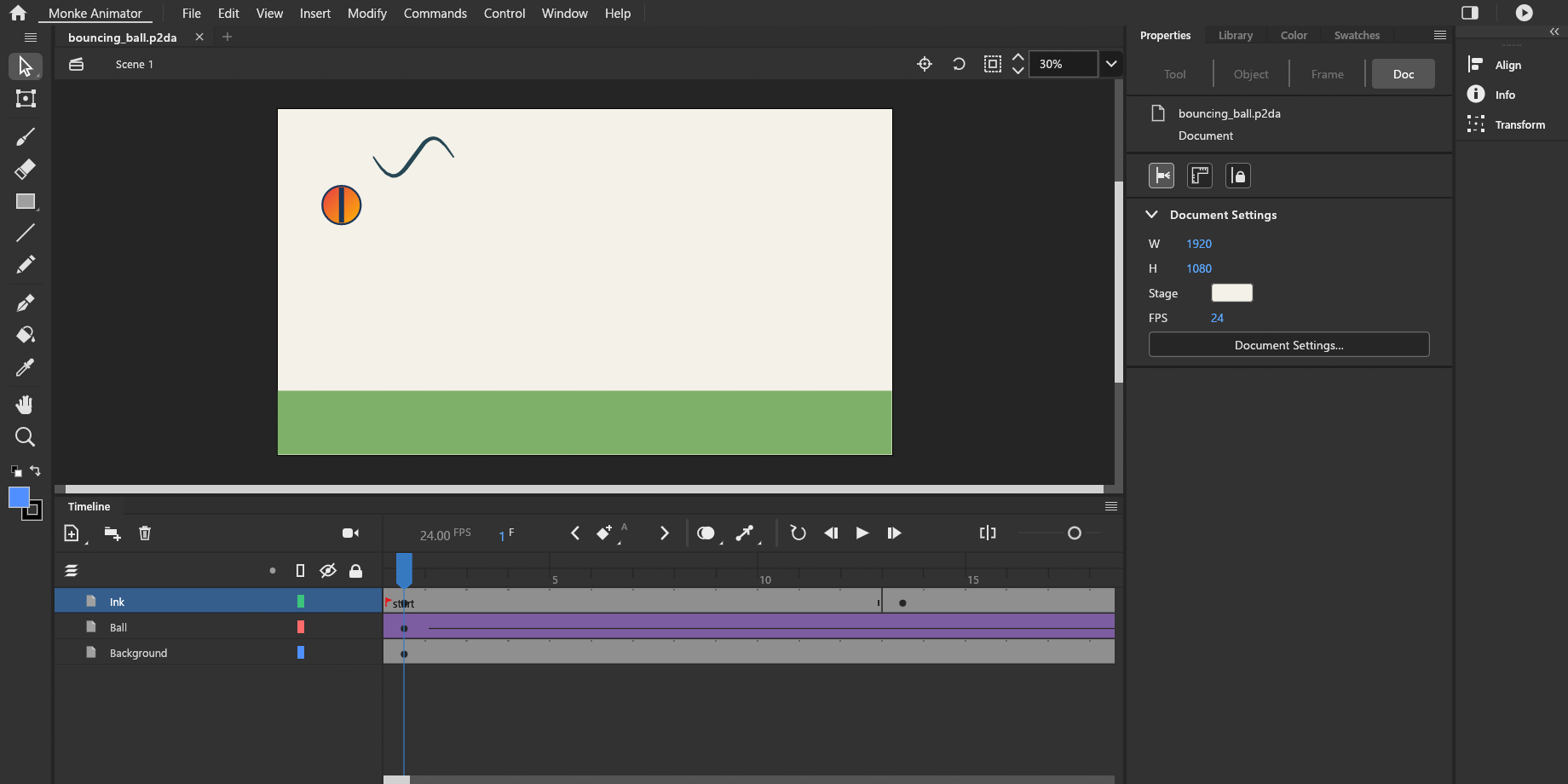
Monke Animator's Animate Classic workspace: tools on the left, the stage with a drawing in the middle, the timeline below and Properties on the right.

This is Early Access

Monke Animator is still being built. It works and is tested, but it is not finished: some tools you know from other programs are missing, there are bugs, and things will change between versions.

Save often, keep copies of work you care about, and tell us what goes wrong. Everything on this page describes what the current version really does.

What it can do today

Only things that are built and tested in version 0.13.0 are listed here.

Draw

  • Brush with pen pressure, Pencil, Eraser
  • Line, Rectangle, Oval and Polygon tools
  • Pen tool with Bézier curves and point editing
  • Paint Bucket that can close small gaps
  • Merge Drawing and Object Drawing, as in Animate

Animate

  • Frame timeline with keyframes and onion skin
  • Classic tweens and shape tweens with easing
  • Auto-keyframe when you move something on a later frame
  • Layers, layer folders, mask layers and guide layers
  • A camera layer you can move, zoom, turn and tween

Symbols

  • Graphic and Movie Clip symbols with their own timelines
  • Edit a symbol in place on the stage
  • A Library panel for symbols, images and sounds
  • Colour effects and blend modes on instances

Transform

  • Free Transform: move, scale, rotate, skew
  • A transformation point you can place anywhere
  • Rotation that snaps to useful angles (Animate Classic workspace)
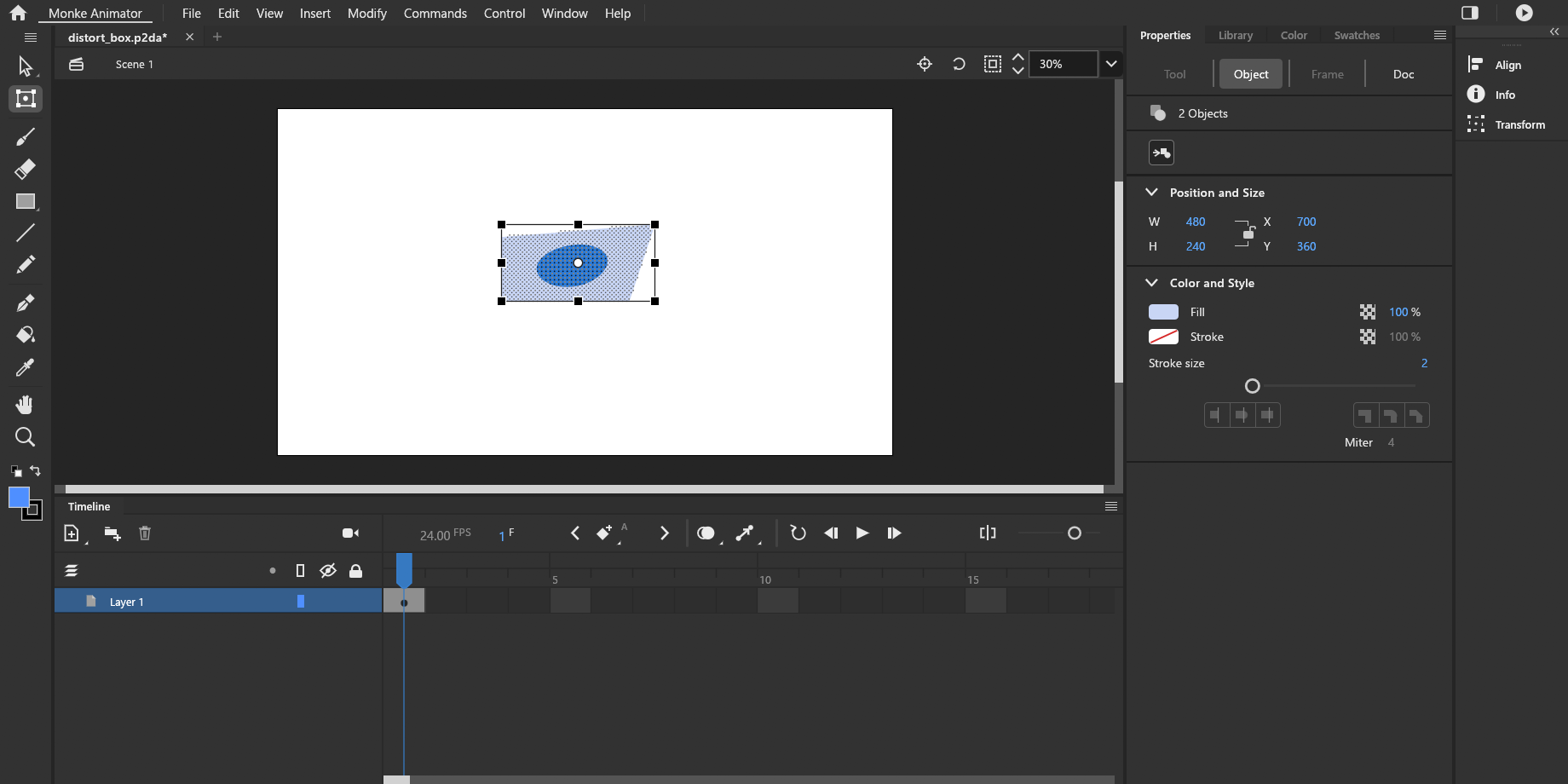
  • New in 0.13.0: Ctrl-drag a corner to distort a shape, Ctrl+Shift-drag to taper it

Sound, import and export

  • Import PNG, JPEG, WebP and GIF images, and SVG artwork
  • Import WAV, MP3, FLAC and OGG sound, kept in sync with the frames
  • Export PNG, PNG sequence, GIF, sprite sheet, SVG and WAV
  • Export MP4 or WebM video if ffmpeg is installed

Made to be trusted

  • Two workspaces: Animate Classic and Modern
  • Keyboard shortcuts you can change
  • Autosave and recovery after a crash
  • No account, no sign-in, no tracking. It works without internet

Not there yet

So you are not surprised: opening Animate files (FLA/XFL) and layered Photoshop files, a text tool, effects such as blur and glow, bone rigs, and automatic updates are planned but not in this version.

Screenshots

Real pictures of version 0.13.0, not mock-ups. Select one to see it full size.

The Animate Classic workspace: tools, stage, timeline and Properties.
Free Transform after a Ctrl-drag of one corner: the shapes are distorted together.
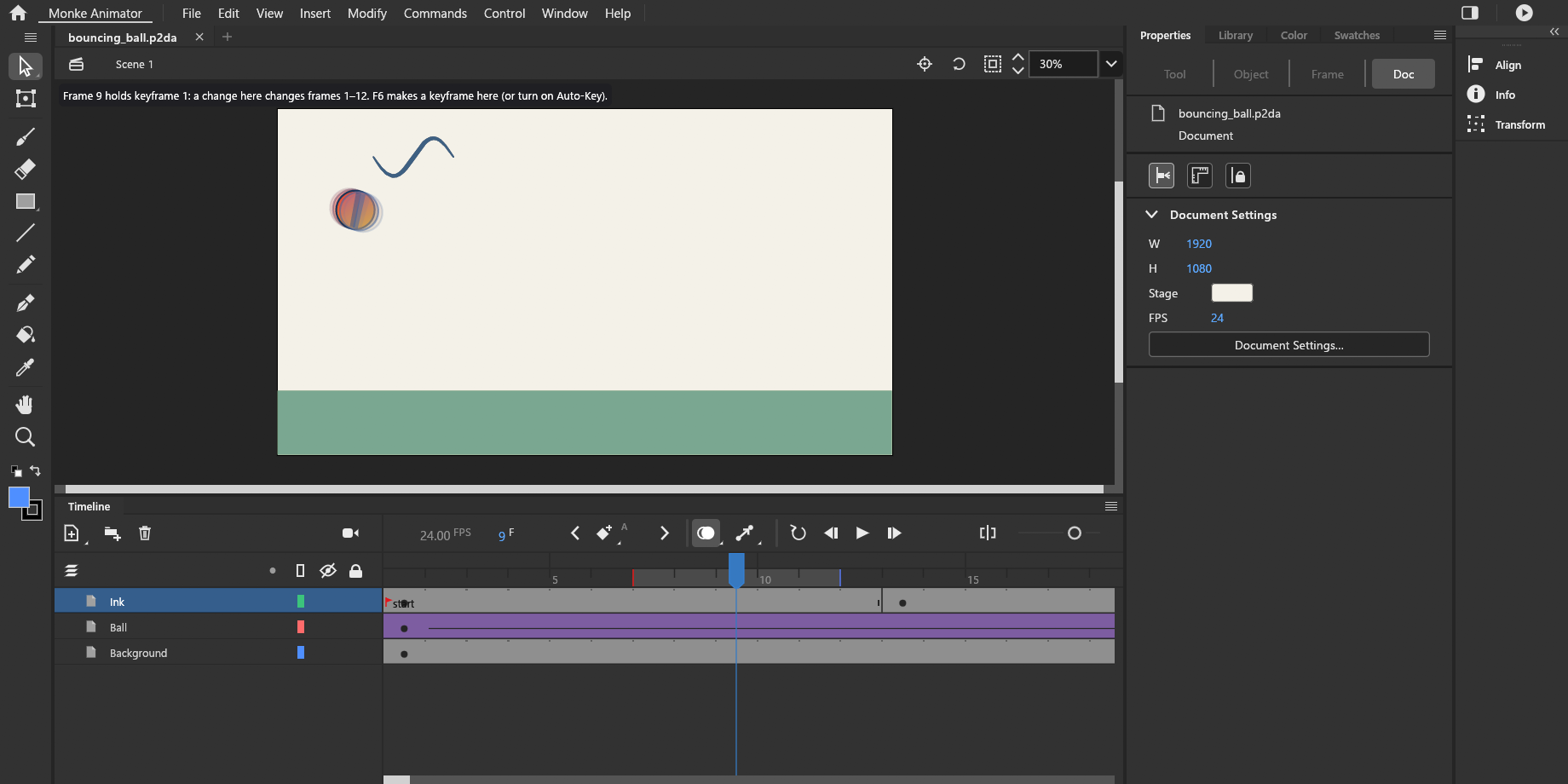
A bouncing ball on the timeline, with onion skin showing the frames around it.
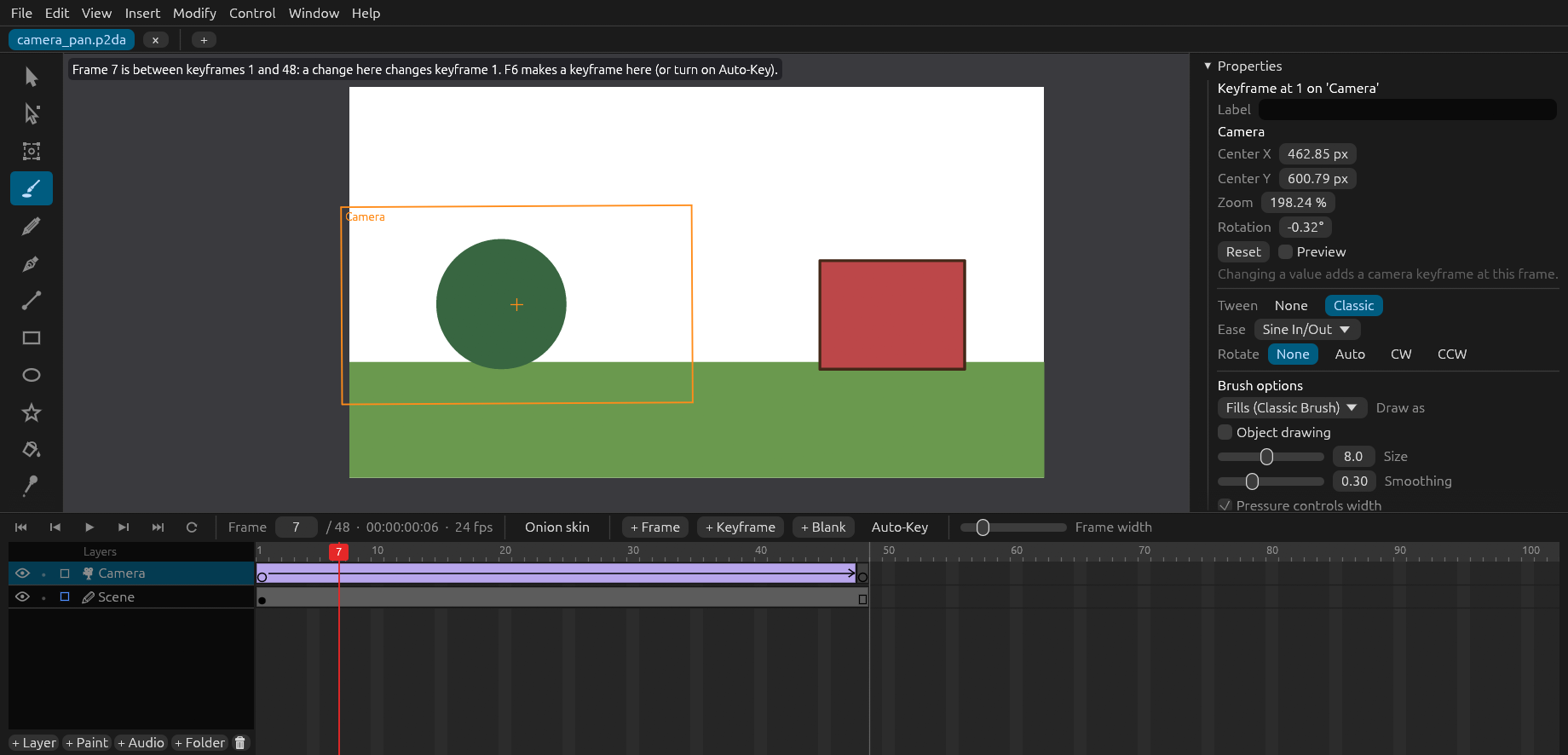
The Modern workspace, here with a camera layer framing part of the scene.

Download

For now Monke Animator comes as one ZIP file you extract. A proper Windows installer is being finished and will replace it as the main download.

Monke Animator 0.13.0 for Windows

10 November 2026 · portable ZIP, 11.6 MB · 64-bit · Early Access

SHA-256 0c5341a5714bd6d0c10740d7892817eb242fd3f77153b835cce2d64f10fa8c54

Download for Windows

How to install and start it

It takes about a minute. Nothing is installed into Windows; the program lives in the folder you put it in.

  1. Download the ZIP file with the button above.
  2. Extract it. Right-click the ZIP, choose Extract All…, and pick a place you will find again, for example your Documents folder. Do not run the program from inside the ZIP.
  3. Start it. Open the extracted folder Monke Animator and double-click MonkeAnimator.exe.
  4. The first time, Windows may show a blue box saying "Windows protected your PC". That appears because the program is new and not yet signed with a paid certificate. Choose More info, then Run anyway.
  5. Optional: right-click MonkeAnimator.exe and choose Pin to Start or Show more options › Send to › Desktop (create shortcut).

Updating to a newer version

Download the new ZIP and extract it, either over the old folder (let Windows replace the files) or to a new place. Your projects are ordinary .p2da files wherever you saved them, and your settings are kept in your Windows user profile, so both stay as they are.

Removing it

Delete the folder. Settings and recovery copies are in %APPDATA%\AnimateArc and %LOCALAPPDATA%\AnimateArc (the folders keep an earlier name of the program); delete those too if you want nothing left.

To check a download is complete and unchanged, open PowerShell in the download folder and run Get-FileHash <file name> -Algorithm SHA256. The result must match the SHA-256 shown beside that download.

System requirements

So far the program has been run on one computer. This is what is known; the rest is marked as untested.

WindowsWindows 11, 64-bit: tested. Windows 10, 64-bit: expected to work, not tested yet. No version for macOS or Linux.
GraphicsA graphics card with a current driver (DirectX 12, Vulkan or OpenGL). Tested with an NVIDIA RTX 4060 Ti. AMD and Intel graphics are not tested yet.
Processor and memoryTested on an Intel Core i7-14700KF with 32 GB of memory. Smaller computers are not tested yet; simple animations need far less.
Disk spaceAbout 40 MB for the program, plus your projects.
Drawing tabletPen pressure works through Windows Ink. Tested with an XP-Pen tablet; other tablets are not tested yet. A mouse works too.
Video exportMP4 and WebM export use ffmpeg, which is not included. Install ffmpeg yourself and make sure Windows can find it (on the PATH). PNG, GIF and the other exports need nothing extra.
InternetNot needed. The program never connects to the internet.

Known limits of this build

  • The program is not code-signed yet, so Windows shows a warning the first time (see How to install).
  • There is no installer and no automatic update yet. You update by downloading a new ZIP. Both are being built.
  • The About window still says "owner-only software". That line is out of date: you are welcome to use this Early Access build under the terms in the LICENSE file that comes with it.
  • If the program does not start at all, your graphics driver is the first thing to update. Then please report it.

Changelog

What changed in each version, newest first.

0.13.0 — Distort and taperLatest

  • New: with Free Transform, Ctrl-drag a corner of a shape to distort it. That corner follows the pointer and the other three stay where they are.
  • New: Ctrl+Shift-drag a corner to taper a shape. The corner at the other end of that edge moves the same distance the other way.
  • Both work on several shapes at once and are one step to undo. Shapes that touch stay together.
  • With a symbol selected the corner scales as before, and a message explains why. To distort a symbol's artwork, double-click the symbol and distort the shapes inside it.
  • First version offered for download on this website.

0.12.0 — Colour picker and rotation angles

  • A click outside the colour popup now just closes it and leaves the colour as it was. To pick a colour from the stage, use the eyedropper button in the popup.
  • With white chosen, the colour bar still shows every hue and the marker stays visible.
  • In Free Transform a rotation snaps to multiples of 45 degrees and back to the angle it started from, so it is easy to put something back straight. Shift turns in 15 degree steps, and the angle shows next to the pointer.

0.11.0 — Drawing engine repairs

  • No more thin white seams between neighbouring fills.
  • A new mark in the same colour no longer takes away the fill underneath it.
  • Artwork you move goes on top and cuts what it is dropped on, as in Animate.
  • Drawing over many shapes is faster.

0.10.0 — Lines that split, long sounds

  • Lines now split the shapes they cross, as in Animate.
  • Very long sounds can now be used: they are prepared once in the background instead of being refused.
  • The official Monke Animator logo, and another round of polish for the Animate Classic workspace.

0.9.0 — Keyframe dragging and selection

  • Dragging keyframes on the timeline works reliably.
  • Drawing over a mark of another colour, and selecting part of a drawing, behave as in Animate.

0.8.0 — Animate Classic workspace and reliability

  • The Animate Classic workspace looks much closer to Animate.
  • New Color, Swatches, Align, Info and Transform panels.
  • Saving can no longer lose your file, and many fixes to undo, the timeline, the camera, the pen, sound and export.

Previous releases

If a new version gives you trouble, you can go back. Extract an older version to its own folder so it does not replace the newer one. A project saved by a newer version may not open in an older one.

Version 0.12.0
9 November 2026
Portable ZIP MonkeAnimator-0.12.0-windows-x64.zip (11.6 MB)
SHA-256 4fbb712a2f3a356483e30ec704584e5017b4f9db99fea6e1ab8addf48e013b42

Report a bug

Bug reports are the most useful thing you can give back. The program can record exactly what happened, so you do not have to describe every click.

  1. Turn recording on: in Monke Animator choose Help › Diagnostics › Record Diagnostics. The window title then says "recording diagnostics".
  2. Do the thing that goes wrong once more.
  3. Save the report: choose Help › Diagnostics › Export Bug Report… and save the ZIP somewhere. You can choose to include a copy of the open project and a picture of the current frame; both are off unless you tick them.
  4. Send it to the person who gave you the link to this site, with one or two sentences about what you expected and what happened instead.

What is in a report

Only what happened inside Monke Animator's own window: tool and menu actions, pen and mouse positions on the stage, the version, your display sizes, and messages the program showed. Nothing is recorded outside the program, and nothing is ever sent anywhere by itself: the file stays on your computer until you send it.